# Make payment
Great! If you've reached this point, it means you have successfully set up and initialized the SDK. Now you can start making payments.
To make a payment, call the `makePayment` function on the `TeyaCommonTransactionsApi` instance:
```tabs
tab:
title: Kotlin (callbacks)
content:
```kotlin
val paymentSubscription = teyaPosLinkSDK.transactionsApi.makePayment(
transactionId = UUID.randomUUID().toString(), // or pass whatever identifier you already have for the payment you're about to make
amount = amountToPay, // the total amount to be paid including the tip, in the smallest unit of the currency (e.g., cents).
currency = "GBP", // The ISO 4217 currency code (e.g., "GBP", "EUR").
tip = null // An optional tip amount, in the smallest unit of the currency.
)
```
tab:
title: Kotlin (coroutines)
content:
```kotlin
val paymentHandle = teyaPosLinkSDK.transactions.makePayment(
transactionId = UUID.randomUUID().toString(), // or pass whatever identifier you already have for the payment you're about to make
amount = amountToPay, // the total amount to be paid including the tip, in the smallest unit of the currency (e.g., cents).
currency = "GBP", // The ISO 4217 currency code (e.g., "GBP", "EUR").
tip = null // An optional tip amount, in the smallest unit of the currency.
)
```
tab:
title: Java
content:
```java
PaymentStateSubscription paymentSubscription = teyaPosLinkSDK.getTransactionsApi().makePayment(
UUID.randomUUID().toString(), // transactionId: or pass whatever identifier you already have for the payment you're about to make
amountToPay, // amount: the total amount to be paid including the tip, in the smallest unit of the currency (e.g., cents).
"GBP", // currency: The ISO 4217 currency code (e.g., "GBP", "EUR").
null // tip: An optional tip amount, in the smallest unit of the currency.
);
```
```
## Subscribe to Payment Status Updates
The `makePayment` call returns a `PaymentStateSubscription`, which allows you to add and remove listeners for real-time status updates of the payment. In the coroutines API it returns a `PaymentHandle` instead, whose `state` is a `StateFlow` you collect.
When you subscribe to a payment state, you can track the following statuses:
| Status | Final? | Description |
|--------------------------|--------|-------------------------------------------------------------------------------------------------------------------------------------------------------------------------------|
| **Pending** | No | This is the initial temporary state of the payment. It represents the local state before the system receives a response confirming that the payment request has been created. |
| **New** | No | The payment has been created. |
| **In_Progress** | No | The payment is currently being processed and received on the card machine for processing. |
| **Cancelling** | No | The card machine is attempting to cancel the payment. |
| **Canceled** | Yes | The payment was successfully cancelled. |
| **Successful** | Yes | The payment was processed and completed successfully. |
| **Processing_Failed** | Yes | The payment attempt failed due to a processing error (e.g., card declined). |
| **Communication_Failed** | Yes | The payment attempt failed due to a communication issue with the card machine or network. |
By subscribing to these updates, your application can respond to each status appropriately, such as showing a "Processing" screen during `InProgress`, confirming success on `Successful`, or displaying error messages for failed states.
The coroutines API offers two ways to follow a payment. `stateUntilCompletion()` emits the current state and every change, then completes once the payment reaches a final state — use it to drive UI as the payment progresses. `awaitCompletion()` skips the intermediate states and suspends until the final one, for when you only care about the outcome. Collecting `state` directly also works, but a `StateFlow` never completes, so a plain `collect` would suspend forever after the payment finishes.
```tabs
tab:
title: Kotlin (callbacks)
content:
```kotlin
val listener = object : PaymentStateSubscription.PaymentStateChangeListener {
override fun onPaymentStateChanged(state: PaymentStateSubscription.PaymentStateDetails) {
println("new state = $state, is it a final state = $state.isFinal")
}
}
paymentSubscription.subscribe(listener)
```
tab:
title: Kotlin (coroutines)
content:
```kotlin
paymentHandle.stateUntilCompletion().collect { state ->
println("new state = $state, is it a final state = ${state.isFinal}")
}
```
tab:
title: Java
content:
```java
PaymentStateSubscription.PaymentStateChangeListener listener = state -> {
System.out.println("new state = " + state + ", is it a final state = " + state.isFinal());
};
paymentSubscription.subscribe(listener);
```
```
The `PaymentStateDetails` object includes the following parameters:
```kotlin
data class PaymentStateDetails(
val eposTransactionId: String,
val amount: Int,
val tip: Int?,
val currency: String,
val state: PaymentState,
val inProgressState: InProgressState?,
val gatewayTransactionId: GatewayTransactionId? = null, // GatewayPaymentId for a payment, GatewayRefundId for a refund
val reason: PaymentStateReason? = null,
val debugErrorMessage: String? = null,
val metadata: Metadata? = null,
val transactionTimestamp: Long? = null,
val wasUnsubscribed: Boolean = false
)
```
`gatewayTransactionId` is the Teya backend id of the created transaction (set on the `Successful` state). Read it through the `gatewayPaymentId` accessor (the id for a payment, `null` for a refund) or the `gatewayRefundId` accessor (the id for a refund, `null` for a payment). The `PaymentStateSubscription` also exposes a `transactionType` property (`TransactionType.Payment` or `TransactionType.Refund`) telling you which kind it tracks. The coroutines API's `PaymentHandle` exposes the same property.
```admonition
icon: fas fa-info-circle
content: To support referenced refunds, make sure to store the `gatewayPaymentId`. Your application should pass this value on any refund request to identify the target transaction.
```
## Use Teya Pre-built Payment Interface
You can use the default **Teya Payment UI** to handle the user interface during a payment. This built-in UI appears automatically while the payment is in progress.
It helps you avoid building your own payment progress interface, making integration faster and easier.
In the coroutines API `showTeyaPaymentInProgressUi` is a `suspend` function that returns the last `PaymentStateDetails` it displayed, so its return value takes the place of the callback API's `onDismiss`.
```tabs
tab:
title: Kotlin (callbacks)
content:
```kotlin
paymentSubscription.subscribe(
TeyaPosLinkPaymentInProgressUi(
autoDismissOnFinalStateAfterMs = 2000, // Configurable. Time in ms before the UI auto-dismisses after a final payment state.
onDismiss = { // Optional callback invoked after dismissing the UI with the current PaymentStateDetails.
println("Payment UI dismissed with payment state details: $it")
}
)
)
```
tab:
title: Kotlin (coroutines)
content:
```kotlin
val finalState = paymentHandle.showTeyaPaymentInProgressUi(
autoDismissOnFinalStateAfter = 2.seconds // Time the UI stays up after a final payment state.
)
println("Payment UI dismissed with payment state details: $finalState")
```
tab:
title: Java
content:
```java
paymentSubscription.subscribe(
TeyaPosLinkPaymentInProgressUi.create(
2000, // autoDismissOnFinalStateAfterMs: Configurable. Time in ms before the UI auto-dismisses after a final payment state.,
paymentStateDetails -> { // onDismiss: Optional callback invoked after dismissing the UI with the current PaymentStateDetails.
System.out.println("Payment UI dismissed with payment state details: " + paymentStateDetails);
return Unit.INSTANCE;
}
)
);
```
```
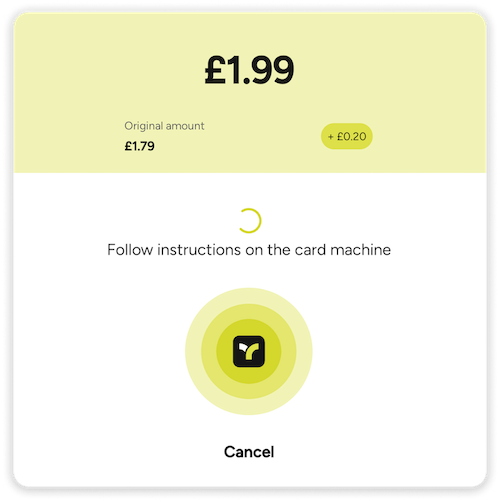
For example, if you set the `amount` and `tip` like this:
```kotlin
amount = 199
tip = 20
```
The Payment UI will look like this:
## Unsubscribing Listeners
To stop receiving payment state updates, you can unsubscribe a previously registered `PaymentStateChangeListener` using the `unsubscribe` function:
```tabs
tab:
title: Kotlin (callbacks)
content:
```kotlin
paymentSubscription.unsubscribe(listener)
```
tab:
title: Java
content:
```java
paymentSubscription.unsubscribe(listener);
```
```
If the listener was created using `TeyaPosLinkPaymentInProgressUi` function, the associated UI will automatically close if it is currently open.
```tabs
tab:
title: Kotlin (callbacks)
content:
```kotlin
val ui = TeyaPosLinkPaymentInProgressUi()
paymentSubscription.subscribe(ui)
// ...
paymentSubscription.unsubscribe(ui) // Automatically closes the UI if it's visible
```
tab:
title: Java
content:
```java
PaymentStateSubscription.PaymentStateChangeListener ui = TeyaPosLinkPaymentInProgressUi.create();
paymentSubscription.subscribe(ui);
// ...
paymentSubscription.unsubscribe(ui); // Automatically closes the UI if it's visible
```
```
```admonition
icon: fas fa-exclamation-triangle
content: Always ensure you remove listeners when they are no longer needed (e.g., when a view disappears) to avoid memory leaks and duplicate updates.
```
### Why there is no `unsubscribe` in the coroutines API
There is nothing to unsubscribe from. `PaymentHandle.state` is a `StateFlow`, so **your `collect` is the subscription** — it ends when you cancel the coroutine, or the scope it runs in. The same applies to `showTeyaPaymentInProgressUi`: it is a `suspend` function, so it dismisses itself when its coroutine is cancelled.
Note that stopping collection only stops you watching — it does not stop the payment. Use `cancel()` for that (see [Cancel a Payment](./cancel-payment.md)).