# Add a tip
POSLink can support tipping on the card machine and ePOS.
In addition to the merchant enabling tipping on your ePOS, they will also need to enable tipping on the card machine via the manage feature settings menu.
## Handling tips in payment requests
Tips are handled as a number in minor units in a new field, separate from the amount. HUF is the exception: it is currently treated without minor units, so a 500 Ft tip is `500`, not `50000`.
The `requested_amount` object will contain the `amount` field and the `tip` field separately. In the below scenario, the amount field represents the total amount to be paid, including the tip amount. The `tip` field is optional in the payment request, and defaults to 0 in the payment response.
**Example:** $2.00 tip, $10.00 basket, $12.00 total.
```tabs
tab:
title: Tip via terminal
content:
1. [Create a payment request](/poslink/develop/send-payment-request#create-a-payment-request) on ePOS:
```json
{
...
"requested_amount": {
"currency": "USD",
"amount": 1000
}
...
}
```
2. Customer adds a 20% tip at the terminal
- POSLink updates total amount to reflect tip.
3. [Retrieve a payment request](https://docs.teya.com/poslink/develop/send-payment-request#retrieve-a-payment-request-and-check-its-status) from ePOS
```json
{
...
"requested_amount": {
"currency": "USD",
"amount": 1200,
"tip": 200
}
...
}
```
tab:
title: Tip via ePOS
content:
1. Merchant or customer inputs 20% tip on ePOS.
2. [Create a payment request](https://docs.teya.com/poslink/develop/send-payment-request#create-a-payment-request) to ePOS
```json
{
...
"requested_amount": {
"currency": "USD",
"amount": 1200,
"tip": 200
}
...
}
```
3. [Retrieve a payment request](https://docs.teya.com/poslink/develop/send-payment-request#retrieve-a-payment-request-and-check-its-status) from POSLink
```json
{
...
"requested_amount": {
"currency": "USD",
"amount": 1200,
"tip": 200
}
...
}
```
```
## Card Machine tip logic
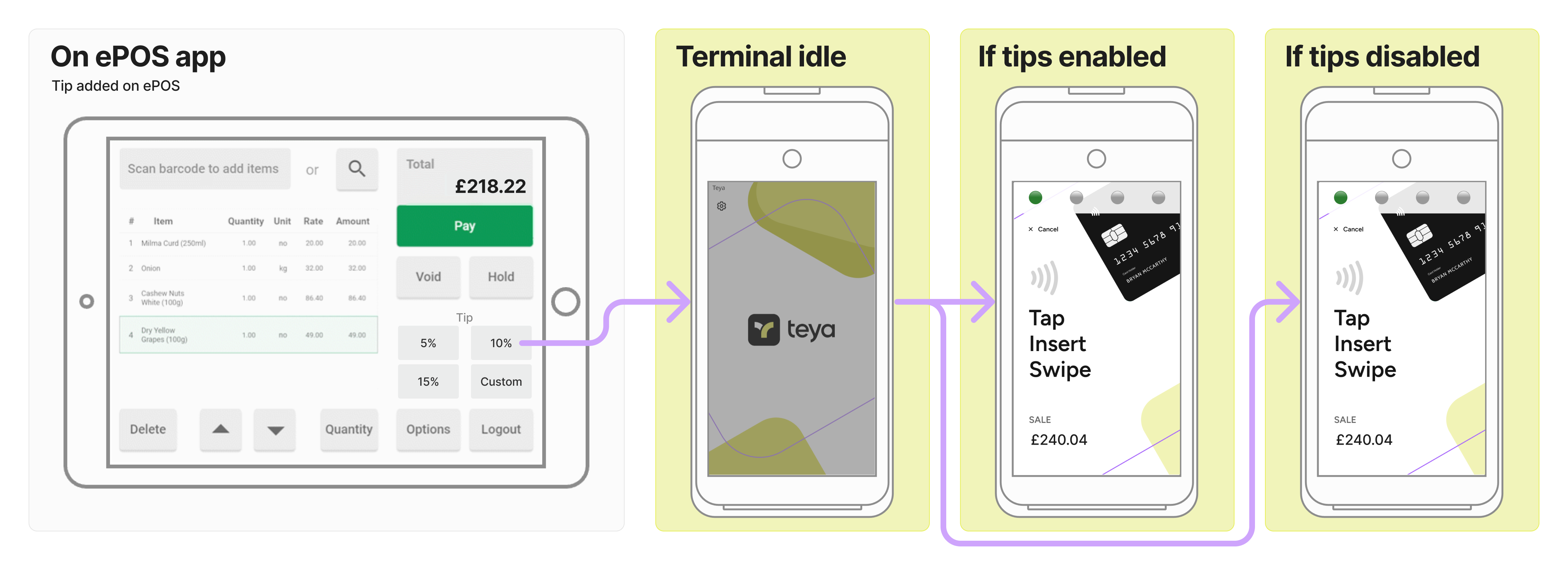
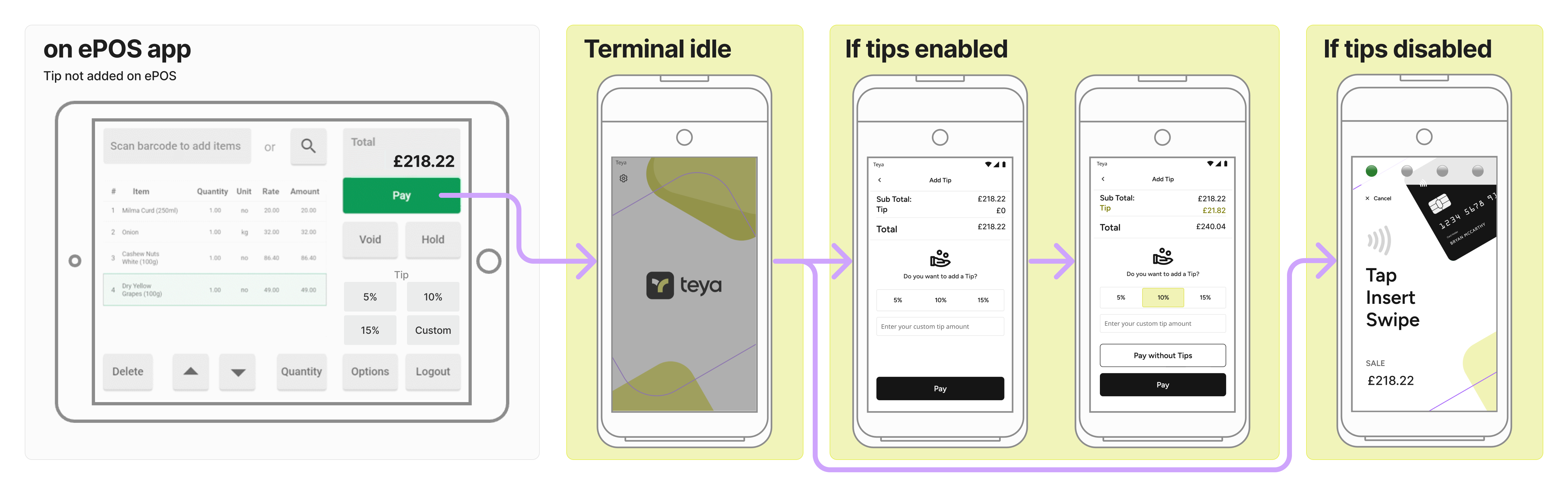
We have introduced logic on the card machine to ensure the merchant doesn't prompt the customer twice for tips.
Card Machine Tip Logic |
---------|
**GIVEN** tips enabled on the ePOS **AND** enabled on the card machine
**WHEN** tip added on the ePOS **AND** payment request sent to the card machine
**THEN** hide tip options on the card machine interface
**GIVEN** tips enabled on the ePOS **AND** enabled on the card machine
**WHEN** tip not added on the ePOS **AND** payment request sent to the card machine
**THEN** show tip options on the card machine. |
## Tip experience
### Tip on card machine
### Tip on ePOS