Make payment
Great! If you've reached this point, it means you have successfully set up and initialized the SDK. Now you can start making payments.
To make a payment, call the makePayment function on the TeyaCommonTransactionsApi instance:
Kotlin (callbacks)
val paymentSubscription = teyaPosLinkSDK.transactionsApi.makePayment(
    transactionId = UUID.randomUUID().toString(), // or pass whatever identifier you already have for the payment you're about to make
    amount = amountToPay, // the total amount to be paid including the tip, in the smallest unit of the currency (e.g., cents).
    currency = "GBP", // The ISO 4217 currency code (e.g., "GBP", "EUR").
    tip = null // An optional tip amount, in the smallest unit of the currency.
)Subscribe to Payment Status Updates
The makePayment call returns a PaymentStateSubscription, which allows you to add and remove listeners for real-time status updates of the payment. In the coroutines API it returns a PaymentHandle instead, whose state is a StateFlow<PaymentStateDetails> you collect.
When you subscribe to a payment state, you can track the following statuses:
| Status | Final? | Description |
|---|---|---|
| Pending | No | This is the initial temporary state of the payment. It represents the local state before the system receives a response confirming that the payment request has been created. |
| New | No | The payment has been created. |
| In_Progress | No | The payment is currently being processed and received on the card machine for processing. |
| Cancelling | No | The card machine is attempting to cancel the payment. |
| Canceled | Yes | The payment was successfully cancelled. |
| Successful | Yes | The payment was processed and completed successfully. |
| Processing_Failed | Yes | The payment attempt failed due to a processing error (e.g., card declined). |
| Communication_Failed | Yes | The payment attempt failed due to a communication issue with the card machine or network. |
By subscribing to these updates, your application can respond to each status appropriately, such as showing a "Processing" screen during InProgress, confirming success on Successful, or displaying error messages for failed states.
The coroutines API offers two ways to follow a payment. stateUntilCompletion() emits the current state and every change, then completes once the payment reaches a final state — use it to drive UI as the payment progresses. awaitCompletion() skips the intermediate states and suspends until the final one, for when you only care about the outcome. Collecting state directly also works, but a StateFlow never completes, so a plain collect would suspend forever after the payment finishes.
Kotlin (callbacks)
val listener = object : PaymentStateSubscription.PaymentStateChangeListener {
    override fun onPaymentStateChanged(state: PaymentStateSubscription.PaymentStateDetails) {
        println("new state = $state, is it a final state = $state.isFinal")
    }
}
paymentSubscription.subscribe(listener)The PaymentStateDetails object includes the following parameters:
data class PaymentStateDetails(
    val eposTransactionId: String,
    val amount: Int,
    val tip: Int?,
    val currency: String,
    val state: PaymentState,
    val inProgressState: InProgressState?,
    val gatewayTransactionId: GatewayTransactionId? = null, // GatewayPaymentId for a payment, GatewayRefundId for a refund
    val reason: PaymentStateReason? = null,
    val debugErrorMessage: String? = null,
    val metadata: Metadata? = null,
    val transactionTimestamp: Long? = null,
    val wasUnsubscribed: Boolean = false
)
gatewayTransactionId is the Teya backend id of the created transaction (set on the Successful state). Read it through the gatewayPaymentId accessor (the id for a payment, null for a refund) or the gatewayRefundId accessor (the id for a refund, null for a payment). The PaymentStateSubscription also exposes a transactionType property (TransactionType.Payment or TransactionType.Refund) telling you which kind it tracks. The coroutines API's PaymentHandle exposes the same property.
Use Teya Pre-built Payment Interface
You can use the default Teya Payment UI to handle the user interface during a payment. This built-in UI appears automatically while the payment is in progress.
It helps you avoid building your own payment progress interface, making integration faster and easier.
In the coroutines API showTeyaPaymentInProgressUi is a suspend function that returns the last PaymentStateDetails it displayed, so its return value takes the place of the callback API's onDismiss.
Kotlin (callbacks)
paymentSubscription.subscribe(
  TeyaPosLinkPaymentInProgressUi(
    autoDismissOnFinalStateAfterMs = 2000, // Configurable. Time in ms before the UI auto-dismisses after a final payment state.
    onDismiss = { // Optional callback invoked after dismissing the UI with the current PaymentStateDetails.
        println("Payment UI dismissed with payment state details: $it")
    }
  )
)For example, if you set the amount and tip like this:
amount = 199
tip = 20
The Payment UI will look like this: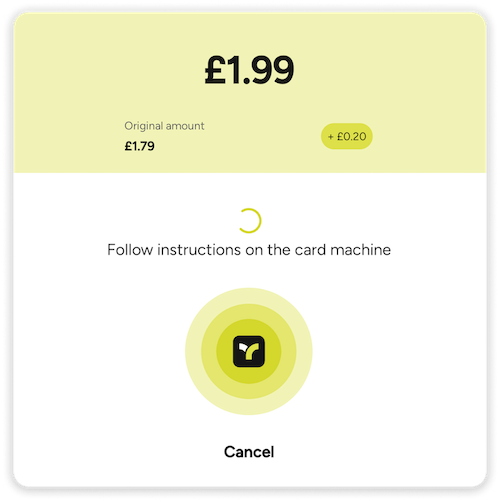
Unsubscribing Listeners
To stop receiving payment state updates, you can unsubscribe a previously registered PaymentStateChangeListener using the unsubscribe function:
Kotlin (callbacks)
paymentSubscription.unsubscribe(listener)If the listener was created using TeyaPosLinkPaymentInProgressUi function, the associated UI will automatically close if it is currently open.
Kotlin (callbacks)
val ui = TeyaPosLinkPaymentInProgressUi()
paymentSubscription.subscribe(ui)

// ...

paymentSubscription.unsubscribe(ui) // Automatically closes the UI if it's visibleWhy there is no unsubscribe in the coroutines API
There is nothing to unsubscribe from. PaymentHandle.state is a StateFlow, so your collect is the subscription — it ends when you cancel the coroutine, or the scope it runs in. The same applies to showTeyaPaymentInProgressUi: it is a suspend function, so it dismisses itself when its coroutine is cancelled.
Note that stopping collection only stops you watching — it does not stop the payment. Use cancel() for that (see Cancel a Payment).