Poslink overview
Poslink is Teya's solution for in-person card payments, designed to connect your ePOS directly with a Teya card machine through secure cloud communication. Instead of relying on local network setups or complex hardware, Poslink provides a streamlined way for your point of sale to talk to the payment card machine.
With this integration, every transaction initiated from your ePOS is passed seamlessly to the card machine, and the payment response is returned in real time. This allows you to manage the full payment journey - from initiation to confirmation - within your ePOS, while the Teya card machine handles card processing securely.
Whether you're running a single shop or managing multiple locations, Poslink gives you the flexibility to integrate payments directly into your checkout experience, with minimal setup effort and maximum control.
How the POSLink SDKs work
The ePOS SDKs are the fastest way to integrate. Your ePOS application communicates with the Teya payment card machine over the cloud, while the SDK removes the complexity of the integration:
- Managed authentication - the SDK handles OAuth client authentication and token refresh automatically.
- Prebuilt payment UI - ready-to-use payment screens for a consistent UX without extra development.
- Full payment flow logic - making payments, tips, cancellations, refunds, receipts, and Pay at Table are handled through SDK calls, with responses returned to your ePOS in real time.
Always use the SDK where one is available for your platform. Only integrate directly against the POSLink API, with raw request/response calls, if your platform isn't covered by an SDK.
Before you start
1. Get your Developer Access Account
- Go to partner.teya.xyz to access the development environment
- If you don't have access, contact your Partnership Manager or partnersupport@teya.com
2. Get your Testing Toolkit
- Test Account - Contact your Partnership Manager to receive a test merchant account for development
- Payment Application - Download the Teya mock payment app APK with pre-built test cards for various scenarios
- Physical Card Machine (Optional) - The payment application can run on any Android emulator, or request a physical card machine from your Partnership Manager
Once you're set up, see Setup & Authentication for how getting credentials, authenticating the merchant, and linking a store and card machine work across every integration method.
Choose your integration
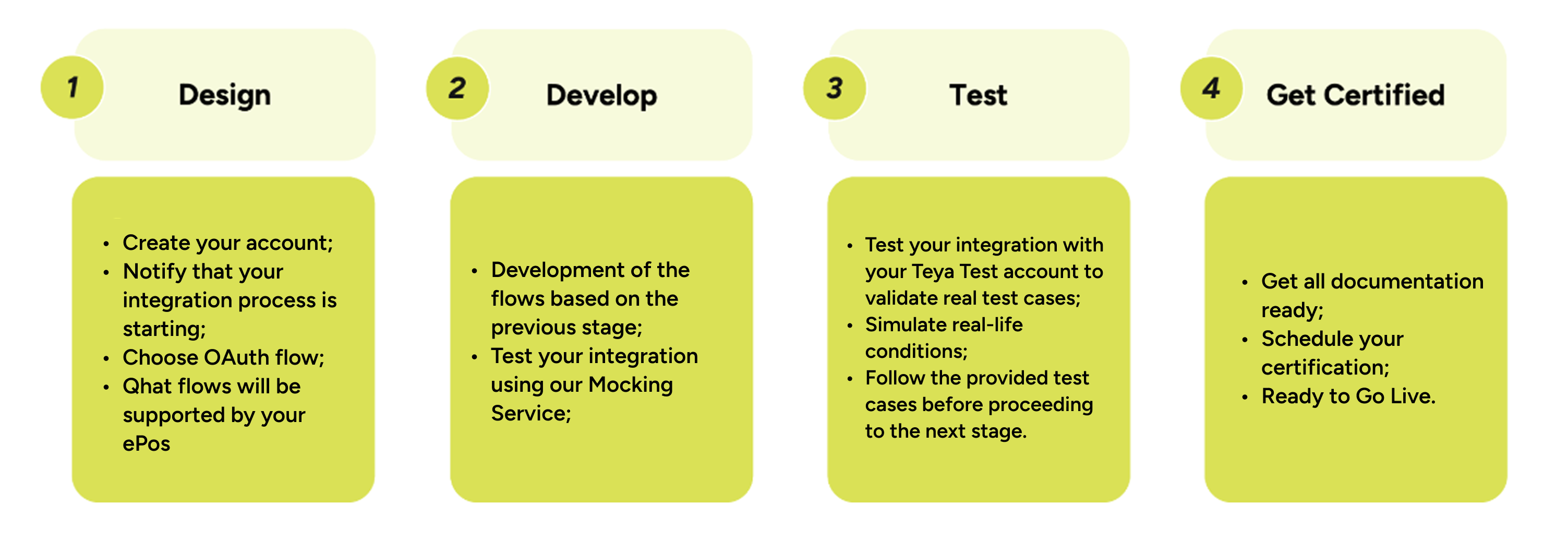
4 Stages to Go-Live
The 4 stages were design to walk you through the step-by-step process of integrating with our API.
Please follow all the recommendations and steps during all stages to ensure a smooth integration process.