Make payment
Great! If you've reached this point, it means you have successfully set up and initialized the SDK. Now you can start making payments.
To make a payment, call the makePayment function on the TeyaCommonTransactionsApi instance:
let transactionId = UUID().uuidString // Or pass a transaction identifier you already use in your app
let amountToPay: Int32 = 199           // Amount in the smallest currency unit (e.g., cents)
let currency = "GBP"                   // ISO 4217 currency code (e.g., "GBP", "EUR")
let tipAmount: Int32? = nil            // Optional

let paymentSubscription = teyaPosLinkSDK.transactionsApi.makePayment(
    transactionId: transactionId,
    amount: amountToPay,
    currency: currency,
    tip: tipAmount?.toKotlinInt()
)

extension Int32 {
    func toKotlinInt() -> KotlinInt {
        return KotlinInt(int: self)
    }
}
Subscribe to payment status updates
The makePayment call returns a subscription that lets you add listeners for real-time status updates of the payment.
First, let's create a small Swift wrapper for the TeyaPaymentStateChangeListener protocol:
private class PaymentStateChangeListener: TeyaPaymentStateChangeListener {
    func onPaymentStateChanged(state: TeyaPaymentStateDetails) {
        print("Payment state changed: \(state)")

        if state.isFinal {
            if state.state == TeyaPaymentState.successful {
                // Persist the gatewayPaymentId to refund later on
            }
            // Update your UI accordingly
        }
    }
}
Then let's add the listener:
paymentSubscription.subscribe(listener: PaymentStateChangeListener())
Payment state details
The TeyaPaymentStateDetails object includes the following information:
PaymentState.InProgress main stateSuccessful state. Read it via gatewayPaymentId or gatewayRefundId.nil for a refund. Persist this to support referenced refunds.nil for a payment.Where TeyaPaymentState can be:
| Status | Final? | Description |
|---|---|---|
| Pending | No | This is the initial temporary state of the payment. It represents the local state before the system receives a response confirming that the payment request has been created. |
| New | No | The payment has been created. |
| In_Progress | No | The payment is currently being processed and received on the card machine for processing. |
| Cancelling | No | The card machine is attempting to cancel the payment. |
| Canceled | Yes | The payment was successfully cancelled. |
| Successful | Yes | The payment was processed and completed successfully. |
| Processing_Failed | Yes | The payment attempt failed due to a processing error (e.g., card declined). |
| Communication_Failed | Yes | The payment attempt failed due to a communication issue with the card machine or network. |
The subscription also exposes a transactionType property (TeyaTransactionType.payment or TeyaTransactionType.refund) telling you whether it tracks a payment or a refund.
Use Teya pre-built payment interface
You can use the default Teya Payment UI to handle the user interface during a payment. This built-in UI appears automatically while the payment is in progress.
It helps you avoid building your own payment progress interface, making integration faster and easier.
paymentSubscription.subscribe(
    listener: TeyaPosLinkInProgressUiKt.create(
        autoDismissOnFinalStateAfterMs: 2000 // Time in ms before the UI auto-dismisses after a final state
    )
)
For example, if you set the amount and tip like this:
let amountToPay: Int32 = 199
let tipAmount: Int32 = 20
The Payment UI will look like this: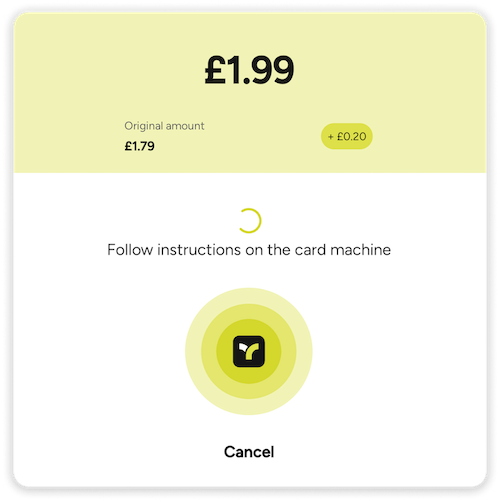
Unsubscribing listeners
To stop receiving payment state updates, you can unsubscribe a previously registered listener using unsubscribe:
// Keep a reference to the listener you subscribed with
let uiListener = TeyaPosLinkInProgressUiKt.create()
paymentSubscription.subscribe(listener: uiListener)

// ... later on
paymentSubscription.unsubscribe(listener: uiListener)
If the listener was created using TeyaPosLinkInProgressUiKt.create, the associated UI will automatically close if it is currently open.
// Example with a custom listener
let listener = PaymentStateChangeListener()
paymentSubscription.subscribe(listener: listener)

// ... later on
paymentSubscription.unsubscribe(listener: listener)