Send a payment request
Once the card machine is successfully paired with the ePOS,
the merchant is now able to submit payment requests to POSLink for their Teya card machine to action.
The ePOS app's interaction with POSLink for payment requests is simple:
- Create a payment request.
- Retrieve a payment request and check its status.
Create a payment request
Given a Merchant has created an order on the ePOS application, when the merchant is ready to take payment, they will then trigger a call to POSLink and
create a payment request.
The amount in requested_amount is an integer in the smallest currency unit (e.g. 1500 = £15.00), inclusive of any tip.
HUF is currently treated without minor units in payment requests: send 2500 for 2500 Ft, not 250000.
POST /poslink/v3/payment-requests HTTP/1.1
Content-Type: application/json
Authorization: bearer {{token}}
Idempotency-Key: {{$uuid}}
Host: api.teya.com
Content-Length: 336

{
  "store_id": "da728238-ee94-470a-a1ba-a03161fdf98c",
  "terminal_id": "2a3bdd2f-b52a-426c-b0fc-48c963650882",
  "requested_amount": {
    "amount": 10150000,
    "currency": "GBP"
  },
  "transaction_type": "SALE",
  "merchant_reference": "efc3fc52-8293-45b6-9f3e-b3b0f8f77266",
  "epos_instance_id": "12121-32321-213213213-23213"
}
{
  "payment_request_id": "dfc4fc52-8293-45b6-9f3e-b3b0f8f88188",
  "created_at": "2022-06-15T16:26:12Z",
  "merchant_reference": "efc3fc52-8293-45b6-9f3e-b3b0f8f77266",
  "terminal_id": "2a3bdd2f-b52a-426c-b0fc-48c963650882",
  "requested_amount": {
    "amount": 10150000,
    "currency": "GBP",
    "tip": 0
  },
  "status": "NEW",
  "transaction_type": "SALE",
  "updated_at": "2022-06-15T16:26:12Z",
  "epos_instance_id": "12121-32321-213213213-23213",
  "store_id": "da728238-ee94-470a-a1ba-a03161fdf98c"
}
Use of Idempotency Key
An idempotency key is a unique identifier sent by a client to ensure that a particular operation is only performed by server once, even if the request is sent multiple times.
This is particularly useful in distributed systems or over unreliable networks, where retrying requests is common.
Problem we are Solving with Idempotency Key
A typical problem we are aiming to solve with idempotency key is a duplication of payment requests due to network failure. Such duplication can happen in the following situation:
- Client (POS) request a server (Teya) to create a payment
- Server receives the request and creates a payment requested
- Network error occurs
- Client receives error, instead of server response (but a payment request is created)
- Client retries payment creation request (let it be successfully now)
- Two payment requests are created (instead of one)
Idempotency Key solves this problem, as it identifies a duplicated request for a server. So then a server is able to detect a payment request operation duplication, and return existing payment for the 2nd request, rather than creating a duplicate payment.
Proper Use of Idempotency Key
Idempotency Key shoudl be specified as request header Idempotency-Key with a unique value (a UUID is recommended):
POST /poslink/v3/payment-requests
..............^^
Accept: application/json
Authorization: Bearer {{ACCESS_TOKEN}}
Idempotency-Key: 23aa5243-67a0-4a24-b07d-31c0ec5e69d6
^^^^^^^^^^^^^^^..^^^^^^^^^^^^^^^^^^^^^^^^^^^^^^^^^^^^
Content-Type: application/json
{
    "epos_instance_id": "epos_123456",
    "requested_amount": {
        "amount": 7.20,
        "currency": "GBP",
        "tip": 1.0
    },
    "merchant_reference": "1412342314234",
    "store_id": "a9682312-f0d7-4423-a83b-23a22d27efa4",
    "terminal_id": "80c267d3",
    "transaction_type": "SALE"
}
Highlight: When a client retries a request (for example, after a network failure),
the same idempotency key must be used.
The server will detect that the identical request has been submitted previously and will return
the existing payment rather than creating a duplicate.
It is important that the request body does not change; otherwise,
the server will refuse to process the repeated request.
Possible Responses
When the server receives a request with an idempotency key, it checks if the key has been registered before.
There are two possible outcomes:
- New Idempotency Key:
The key is saved, and the request is processed normally. - Duplicate Idempotency Key:
The server compares the current request body with the one stored.- If the bodies are identical, the server returns the details of the previously created payment.
- If the request bodies differ, the server refuses to process the request to prevent inconsistency. Example:
HTTP 409 Conflict
{
    "code": "DIFFERENT_REQUEST_BODY_FOR_THE_SAME_IDEMPOTENCY_KEY",
    "description": "Different request body for the same idempotency key"
}
Important: On retry, the server returns the actual state of the previously created payment;
therefore, the status field may differ from “NEW,” as the payment might have already been processed.
The possible values are the same as those used when reading a request:
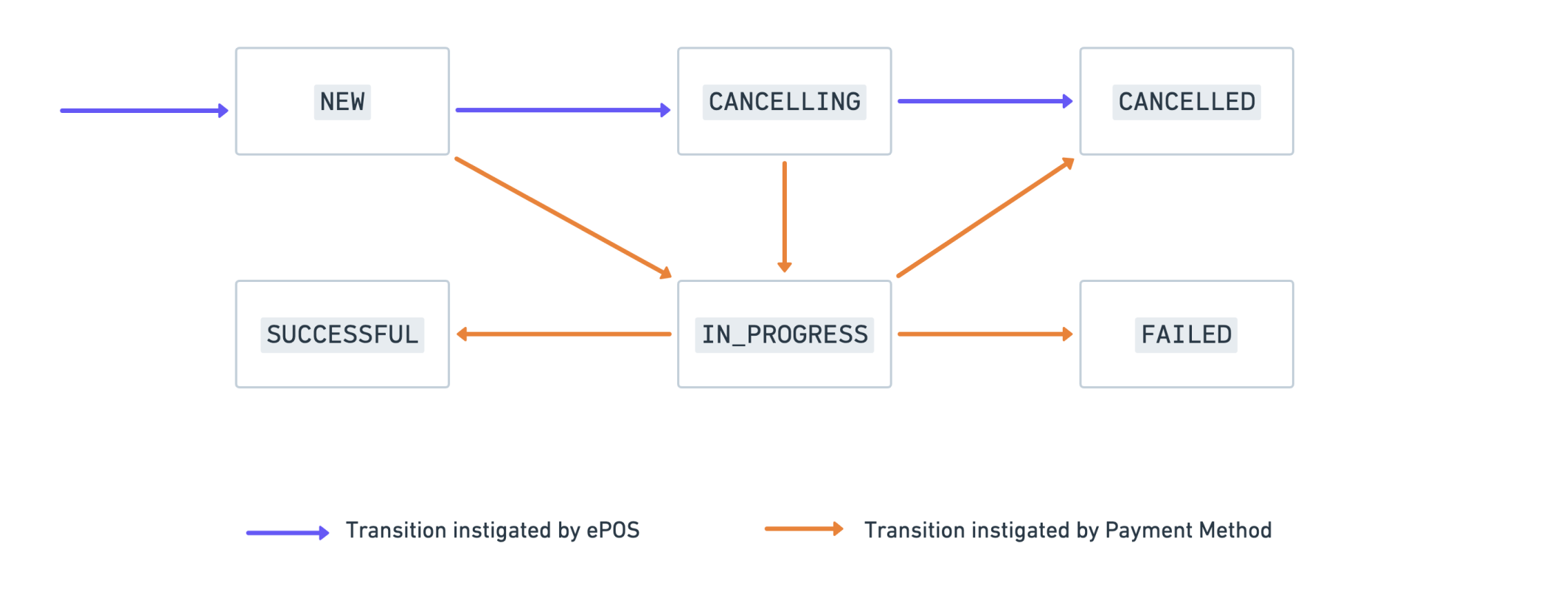
NEW, IN_PROGRESS, SUCCESSFUL, CANCELLING, CANCELLED, FAILED
How to Test that you are using Idempotency Key Properly
You should submit the same request (same body, same idempotency key) twice,
once request after another, and check that in both cases the same payment (id) has been returned.
Retrieve a payment request and check its status
Retrieve a payment request is used to get status updates from POSLink so the ePOS is able to present
the relevant status to the merchant and keep them informed until the order reaches a final state.
The V3 endpoint responds with Content-Type: text/event-stream and delivers updates over Server-Sent Events (SSE) rather than a single JSON body. The ePOS opens one connection and the server streams events until the payment reaches a final state, then closes the stream. There are two event types:
full- a complete snapshot of the payment request, sent as the first event and again as the final event. If the payment is already in a final state when the connection is opened, a singlefullevent is sent and the stream closes immediately.diff- an incremental update sent while the payment isIN_PROGRESS, containing only the changed fields (payment_request_id,status,progress_status,updated_at). The ePOS merges these into its local snapshot bypayment_request_id.
Connection lifetime & reconnecting
A single connection stays open for approximately one minute. If the payment has not reached a final state within that time, the connection closes. When this happens, the ePOS should reconnect to the same endpoint and continue listening. Each reconnect returns a freshfullsnapshot of the current state, so no information is lost. This repeats until afullevent with a final status (SUCCESSFUL,FAILED, orCANCELLED) is received.
After reaching a SUCCESSFUL final state, the final full event includes an object containing additional transaction metadata.
This addition is intended to support various use cases, including consolidated receipt printing.
GET /poslink/v3/payment-requests/{payment-request-id} HTTP/1.1
Accept: text/event-stream
Authorization:
Host: api.teya.com
A typical sequence is: an initial full snapshot, one or more diff updates while the payment is in progress, and a final full snapshot once the payment is SUCCESSFUL. Each event is shown below with its JSON data payload pretty-printed for readability.
On the wire
In a real SSE stream each event is anevent:line followed by a single-linedata:line (the JSON is not pretty-printed) and a blank line separating events. The formatting below is for documentation only.
1. Initial snapshot - event: full
{
  "payment_request_id": "dfc4fc52-8293-45b6-9f3e-b3b0f8f88188",
  "requested_amount": {
    "currency": "GBP",
    "amount": 10,
    "tip": 0
  },
  "status": "NEW",
  "transaction_type": "SALE",
  "created_at": "2022-06-15T16:24:12Z",
  "updated_at": "2022-06-15T16:24:12Z",
  "merchant_reference": "423897410",
  "terminal_id": "70dc65ba-1c13-492a-82a0-15821e5f63ba",
  "store_id": "f04fe1ce-e7bd-4c5b-b873-b156643c0bc3"
}
2. In-progress updates - event: diff (only changed fields)
{
  "payment_request_id": "dfc4fc52-8293-45b6-9f3e-b3b0f8f88188",
  "status": "IN_PROGRESS",
  "progress_status": "WAITING_FOR_CARD_ENTRY",
  "updated_at": "2022-06-15T16:26:12Z"
}
{
  "payment_request_id": "dfc4fc52-8293-45b6-9f3e-b3b0f8f88188",
  "status": "IN_PROGRESS",
  "progress_status": "CARD_PRESENTED",
  "updated_at": "2022-06-15T16:27:12Z"
}
3. Final snapshot - event: full (includes metadata on success, then the stream closes)
{
  "payment_request_id": "dfc4fc52-8293-45b6-9f3e-b3b0f8f88188",
  "requested_amount": {
    "currency": "GBP",
    "amount": 10,
    "tip": 0
  },
  "status": "SUCCESSFUL",
  "transaction_type": "SALE",
  "created_at": "2022-06-15T16:24:12Z",
  "updated_at": "2022-06-15T16:29:12Z",
  "transaction_timestamp": "2022-06-15T16:25:45.123Z",
  "merchant_reference": "423897410",
  "gateway_payment_id": "39e3bacdd5d38d9ce611cf88afbcc86df829a9a5641880b3",
  "terminal_id": "70dc65ba-1c13-492a-82a0-15821e5f63ba",
  "store_id": "f04fe1ce-e7bd-4c5b-b873-b156643c0bc3",
  "metadata": {
    "payment_method_details": {
      "card": {
        "last4": "1234",
        "issuing_country": "GB",
        "brand": "MASTERCARD",
        "type": "DEBIT",
        "bin": "123456"
      },
      "entry_mode": "MAGSTRIPE_SWIPED",
      "verification_method": "OFFLINE_PIN",
      "application_name": "Debit MasterCard",
      "application_id": "A0000000041010",
      "mid": "5006544",
      "response_code": "00",
      "authorisation_code": "A8RLR8"
    }
  }
}
The full event uses the full payment request schema (payment_request_id, requested_amount, status, transaction_type, created_at, updated_at, merchant_reference, status_reason, epos_instance_id, gateway_payment_id, store_id, terminal_id, progress_status, metadata, transaction_timestamp); fields that are not applicable to the current state are omitted (for example metadata appears only on a successful payment). The diff event includes only payment_request_id, status, progress_status, and updated_at.
Status flow diagrams
Below are visual representations of status transitions for a payment request.
Payment request status flow