Cancel a payment request
There are two main ways for a payment request to be cancelled. Either via the ePOS or the card machine depending on the point within the transaction.
Given a payment request has been posted to POSLink and a card has not yet been presented to the card machine for payment, it is possible to cancel via ePOS. However, if the user has started the payment process by presenting their card to the card machine, an attempt to cancel this payment can only be made from the card machine.
Cancelling via ePOS
To cancel a payment request from ePOS:
- ePOS calls POSLink's Update a Payment Request API submitting a status of
CANCELLING. This is a request to cancel - not a confirmation that the payment was cancelled. - A successful response means the cancellation request was accepted and the payment request has moved to
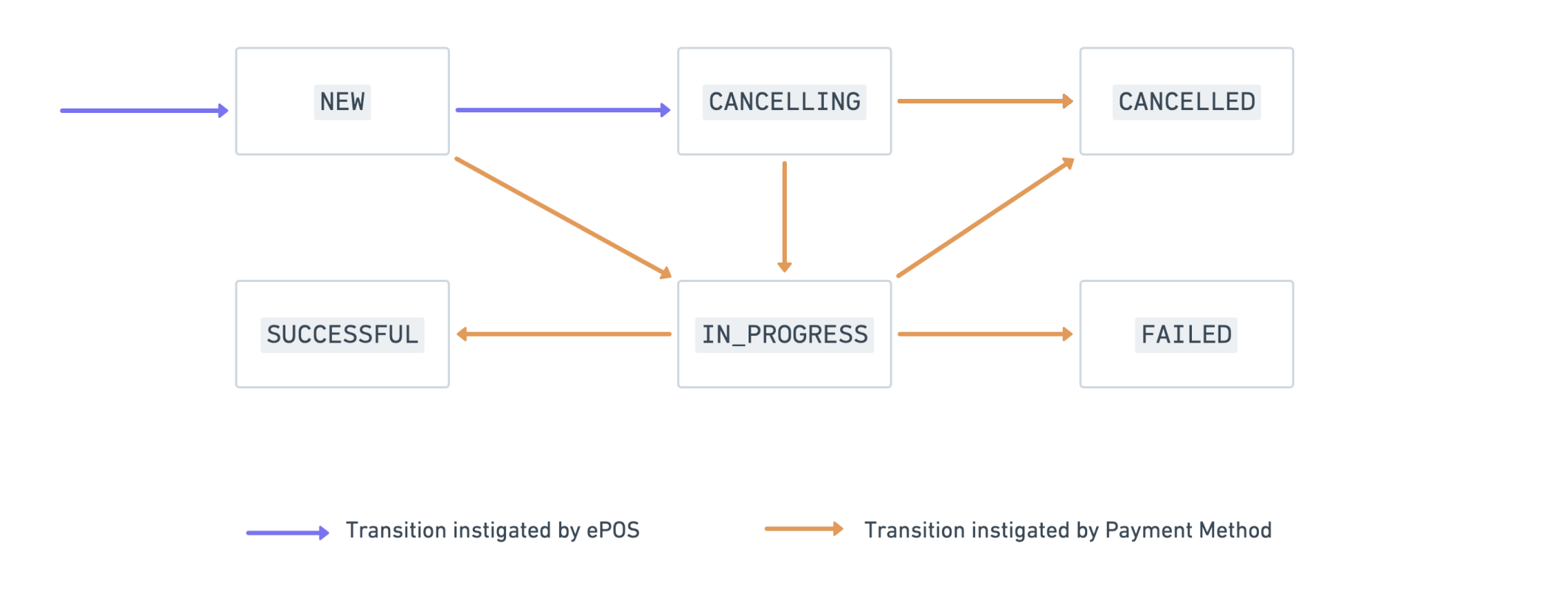
CANCELLING. It does not mean the payment is cancelled. Whether the cancellation takes effect depends on the terminal: if the card has not yet been presented and processing has not started, the terminal cancels the payment request and its status becomesCANCELLEDwith a status reason ofCANCELLED_BY_EPOS; if the terminal has already started processing, the payment continues to its final state (SUCCESSFULorFAILED), which overridesCANCELLING. - ePOS should follow the payment request's status updates via the Retrieve a payment request API until it reaches a final state (
CANCELLED,SUCCESSFULorFAILED). The payment is only cancelled when the status isCANCELLED.
PATCH /poslink/v2/payment-requests/{payment-request-id} HTTP/1.1
Content-Type: application/json
Authorization:
Host: api.teya.com
Content-Length: 28

{
  "status": "CANCELLING"
}
<br>
{
  "payment_request_id": "368dc71b-e9d4-4f30-a94c-0432e30043b6",
  "status": "CANCELLING",
  "updated_at": "2023-03-02T14:39:29.151Z"
}
Status flow diagrams
Below are visual representations of status transitions for a Payment Request.
Payment request status flow